Everyone has something to say. The videos end up scattered across texts, email and a dozen different phones.
The whole show, from every phone in the crowd.
Everyone at the gig shot footage of a piece of it. Share one link, pull in their clips, and get one film of the night: the opener, the singalong, the encore you missed while you were at the bar.
“Film the encore, start to finish.”
“Get the whole crowd singing the chorus.”
“Turn the camera on yourselves when they play THE song.”
“Catch the moment they walk out and the place erupts.”
How to make a concert video from the crowd
Send one link. Everyone records their message in their browser, on any phone or computer, and videos.me compiles the clips into one film you can watch, share or download. Contributors install no app and make no account. You tick the clips you want, drag them into the order you want, and the film is made for you. Free to start, then $0.35 per video you receive, or a bundle.
- One link, no app, no account for the people recording
- Records in any browser, phone or computer
- Free to start, then $0.35 per video received, or a bundle
- You get one film back: watch it, share it, or download it
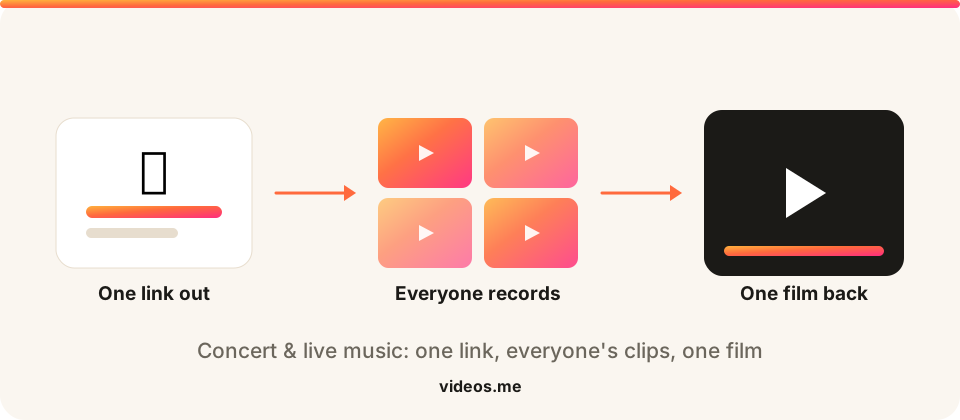
You filmed two songs and your battery died. The person next to you got the encore. Someone up front caught the whole room singing the bridge back. Apart, those are shaky clips buried in everyone’s camera roll. Together, they’re the show. The footage already exists; it is sitting in two hundred camera rolls with nobody to send it to. videos.me gives you one link to pull every angle from everyone who was there, with nothing for them to install and no files to chase, and stitches it into a single film of the night worth rewatching.
What you get back
A preview cut from the prompts on this page. Yours will be the clips your people record.
How it works
Three steps and a few minutes, and never an editor.
Create a link
Add a prompt like “Film the encore, start to finish” and get one shareable link in seconds.
Everyone records
Anyone with the link opens it and records a short clip in their browser. They never install an app or make an account.
We make the film
We stitch the clips into one film that’s yours to watch, download, and share.
How to make a concert video from the crowd
Make the link before the lights drop
Set it up the day of the show and drop it in the group chat, so everyone has it before the first song.
Tell people what to grab
“Film the encore,” “get the singalong.” A quick nudge means you cover the whole set instead of five clips of the same song.
Collect after the houselights come up
No rush. People send their best clips over the next day or two, straight from their phones.
Cut it into one film
Drop the clips into setlist order, compile, and the whole night is one video to send to everyone who was there.
Prompt ideas for your video
?
Pick one. One clear question gets more replies than four. People answer a question; they stall at a brief.
Make it theirs. Swap in the name and the detail only your group knows. “Share a memory of Dad” beats “share a memory.”
Say the length. Naming thirty seconds gives permission to stop, which is usually what someone is waiting for.
Say when you need it. A date does more for replies than any wording.
Give contributors a great question, or write your own.
“Film the encore, start to finish.”
“Get the whole crowd singing the chorus.”
“Turn the camera on yourselves when they play THE song.”
“Catch the moment they walk out and the place erupts.”
Tips for the best results
Shoot the stage landscape
Wide clips of the band cut together better; save vertical for crowd reactions.
Grab the between-song moments
The banter and the roar between songs are what make it feel like you were there.
One song each is plenty
A handful of short, different angles beats one person’s full-set upload.
Works for these, too
One link, the same effortless flow, whatever you’re collecting for.
Event recap
Footage from every attendee, cut into one recap reel.
Event recaps →Youth & rec sports
Every parent’s sideline clip, cut into one season reel.
Team highlight reels →UGC & brand campaigns
Collect customer videos at scale, then cut them into one reel.
UGC campaigns →Birthday videos
A montage of messages from everyone who loves them.
Birthday gifts →Frequently asked questions
Do people need an app to send their clips?
No. They open your link and upload straight from their phone’s camera roll, no app, no account, nothing to sign up for.
Can it handle clips from a bunch of different phones?
That’s the whole point. Mixed phones, mixed orientations, mixed lighting, it all gets stitched into one film.
How many people can contribute?
As many as were at the show. Five friends or five hundred strangers, same single link.
What if one person uploads their whole 90-minute recording?
It’ll upload, but short clips make a far better film. Ask for a song each rather than the entire set.
Can I share the finished video with everyone who came?
Yes. Send a link around, or download it in full quality to keep.
Is this only for big concerts?
Not at all: local shows, open mics, a friend’s band, a festival day. Any gig where more than one phone was out.
Capture every angle of the moments you’ll never get back.
Two minutes to set up, free to create, and nothing to pay until you unlock your videos.
Will people actually record something?
They open the link and record in their browser. Nothing to install, and no account to make.
What if I set it up and nobody sends anything?
Creating a collection is free, and you pay when you unlock your videos. An empty collection costs you nothing.
What do I even ask people to say?
Every occasion page here comes with prompt ideas you can send as they are, or write your own.